Windows 7/Windows 10 and adding this program to the right-click menu...
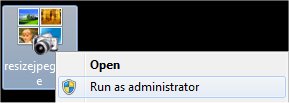
Resize JPEGs provides an option to add itself to the right-click menu of a folder in Windows. Unfortunately on Windows 7 and windows 10 to use this ability, you will have to run Resize JPEGs as Administrator. Here is how its done:
First, right-click on Resize JPEGs and choose Run As Administrator...
You might be prompted with a message about allowing Resize JPEGs to run with Administrator privileges, click YES.
Once Resize JPEGs is loaded, choose the option to Add this program to the right-click menu of a folder and click Close.
Browse to Explorer and right-click on any folder, you should see Resize JPEGs in the list of options for that folder.
Support Our Work
Please consider making a contribution today
to help us keep Resize JPEGs available for everyone.
Didn't find your answer?
Our support team can help you with your specific issue. Submit a request and we'll get back to you.


















 Give Now