What if I have dual monitors, where is the TOP LEFT corner?
If you are lucky enough to have dual monitors you might have a hard time finding the TOP LEFT corner (position 0,0). We look for the primary monitor's TOP LEFT corner, once we detect your mouse pointer to be in this position our prank software will close.
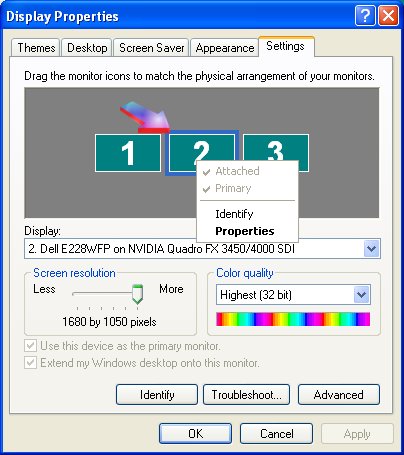
For example: If your primary monitor is on the right side of your desk, the TOP LEFT corner would be on the right monitor in the x,y position 0,0. That is the top-most left-most corner of your right monitor. In the screenshot below, you will see the middle monitor is the "primary" monitor. The arrow is pointing to the TOP LEFT corner of the primary monitor.
Support Our Work
Please consider making a contribution today
to help us keep General Questions available for everyone.
Didn't find your answer?
Our support team can help you with your specific issue. Submit a request and we'll get back to you.



















 Give Now